From a sentence to a KiCad board.
Describe the circuit. Circuited picks the parts, places and routes the board, and hands you KiCad and fab files.
Builds take 10 to 30 seconds. The board opens in KiCad.
Brief it like you’d brief an engineer.
Power, connectors, the parts you care about, size limits. If something that matters is missing, Circuited asks before it starts.
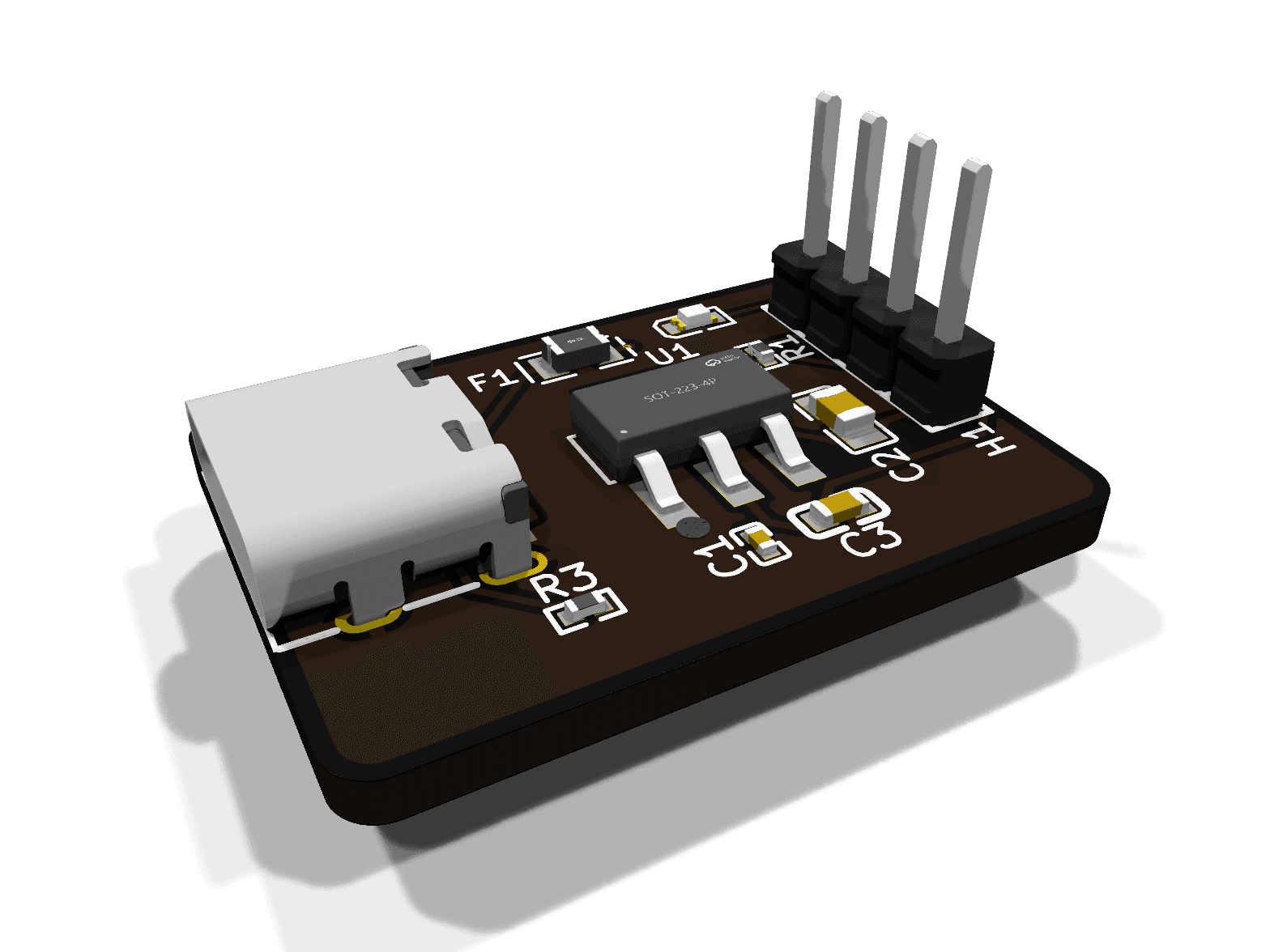
USB-C 5 V to 3.3 V breakout: AMS1117-3.3 with input and output capacitors, a PTC fuse on VBUS, a green power LED and a 4-pin header with 5V, 3V3 and GND
Real parts, checked before they’re placed.
Circuited turns the brief into a netlist: every part, every connection and every requirement, like the input staying between 4.75 and 5.25 V. Parts come from the Circuited library with a footprint and an LCSC number, and a part or pin that doesn’t exist stops the build before anything is placed.
- USB1USB-C, 16 pinC2765186
- F1PTC fuse, 500 mAC883109
- U1AMS1117-3.3, 1 AC6186
- C1100 nF, 0402C1525
- C210 µF, 0805C15850
- C322 µF, 0603C59461
- R11 kΩC11702
- R2, R35.1 kΩC25905
- LED1GreenC12624
- H1Header 1×4, 2.54 mmC2905435
Placed, routed and checked while you watch.
Circuited’s placer puts the footprints on the board, Freerouting routes the copper on two layers, and KiCad’s design-rule check runs on the result. If a connection can’t be routed, you see it, not a finished-looking board.
KiCad’s check found no errors and two silkscreen warnings on the USB-C footprint. You review warnings before you download.
A KiCad project, not a picture.
You review the warnings, then download the files your fab and assembler ask for, plus the KiCad project to keep working by hand.
- circuited-F_Silkscreen.gtoLegend
- circuited-F_Mask.gtsSolder mask
- circuited-F_Cu.gtlFront copper
- circuited-B_Cu.gblBack copper, ground pour
- bom.csv, positions.csvAssembly
- board.kicad_pcbOpens in KiCad
It only places parts it knows.
Every part in the Circuited library has a footprint, a 3D model and an LCSC number: 26 parts today. Ask for something else and Circuited says so, then offers the closest parts it has.
Swap the AMS1117 for an AP2112K, it’s smaller.
The AP2112K isn’t in the library yet, so I can’t place it with a footprint I trust.
Two 3.3 V regulators I can place:
- ME6211 SOT-23-5500 mA, smaller than the SOT-223. Needs 1 µF in and out.Use this
- Keep the AMS1117-3.3 SOT-2231 A, the part on the board now. Needs 10 µF in and out.Keep
Resistors, 0402
- 0 Ω jumperC17168
- 1 kΩC11702
- 2.2 kΩC25879
- 3.3 kΩC25890
- 4.7 kΩC25900
- 5.1 kΩC25905
- 10 kΩC25744
Capacitors
- 1 µF, 0402C52923
- 10 µF, 0805C15850
- 22 µF, 0603C59461
- 100 nF, 0402C1525
LEDs, 0603
- BlueC2288
- GreenC12624
- RedC2286
Power and protection
- USBLC6-2SC6 ESDC7519
- PTC fuse, 500 mAC883109
- AMS1117-3.3, 1 AC6186
- ME6211 3.3 V, 500 mAC82942
Connectors
- Qwiic, JST SH 4 pinC160390
- USB-C, 16 pinC2765186
- Header 1×4, 2.54 mmC2905435
- Header 1×6, 2.54 mmC37208
Modules, sensors, switches
- ESP32-C3-MINI-1C2838502
- BME280 pressure, temperature, humidityC92489
- SHT40 temperature, humidityC2909890
- Tactile switch, 5.1 mmC318884
What’s in the download.
A ZIP per reviewed revision: 26 files, 377 KB for the board on this page. Nothing in it depends on Circuited.
Fabrication
Gerber X2 layers and Excellon drill files from KiCad, with the extensions JLCPCB expects.
- gerbers/circuited-F_Cu.gtl
- gerbers/circuited-B_Cu.gbl
- gerbers/circuited-Edge_Cuts.gm1
- gerbers/circuited-PTH.drl
- gerbers/circuited-NPTH.drl
- and 9 more in gerbers/
Assembly
Bill of materials with LCSC numbers and pick-and-place positions, also in JLCPCB's format.
- bom.csv
- positions.csv
- jlcpcb/bom-jlcpcb.csv
- jlcpcb/cpl-jlcpcb.csv
KiCad
The routed board and its project open in KiCad 10, ready to edit like a board you laid out yourself.
- board.kicad_pcb
- board.kicad_pro
Checks and record
The DRC report, Circuited’s checks, your review, the board as data, and a SHA-256 for every file.
- drc.json
- validation.json
- review.json
- board.json
- manifest.json
- README.txt
What it won’t do yet.
Read this before you order anything.
Good fit
- Small two-layer boardsPower input, regulators, LEDs, I2C sensors, connectors, an ESP32-C3 module
- Parts from the library26 parts today, each with a footprint, a 3D model and an LCSC number
- Boards you’ll open in KiCad before orderingThe download is a normal KiCad 10 project
Not yet
- More than two layers, dense layouts, BGAsPlacement and routing are for simple two-layer boards
- RF, controlled impedance, high-speed busesUSB 3, DDR, antennas you lay out yourself
- Mains voltage or high currentCreepage, clearance and thermal design need a person
- A manufacturer’s sign-offChecks are local: DRC against Circuited’s generic two-layer rules, not your fab’s, and no signal-integrity, thermal or EMC analysis